

Sugargoo Spreadsheet
First edition ·
A collection that keeps moving forward — new finds added regularly, product information refreshed and broken links cleared along the way.
- Checked product links
- Factory photo galleries
- Catalogue updates
- Quick category browsing
Why choose sugargoo-shopping.com?
Browse the collection by category
Shopping for shoes and a bag? Footwear and Bags & Wallets each have their own section. Across the 20 categories you can browse one kind of item at a time, or search for a particular model.
See all colourways at a glance
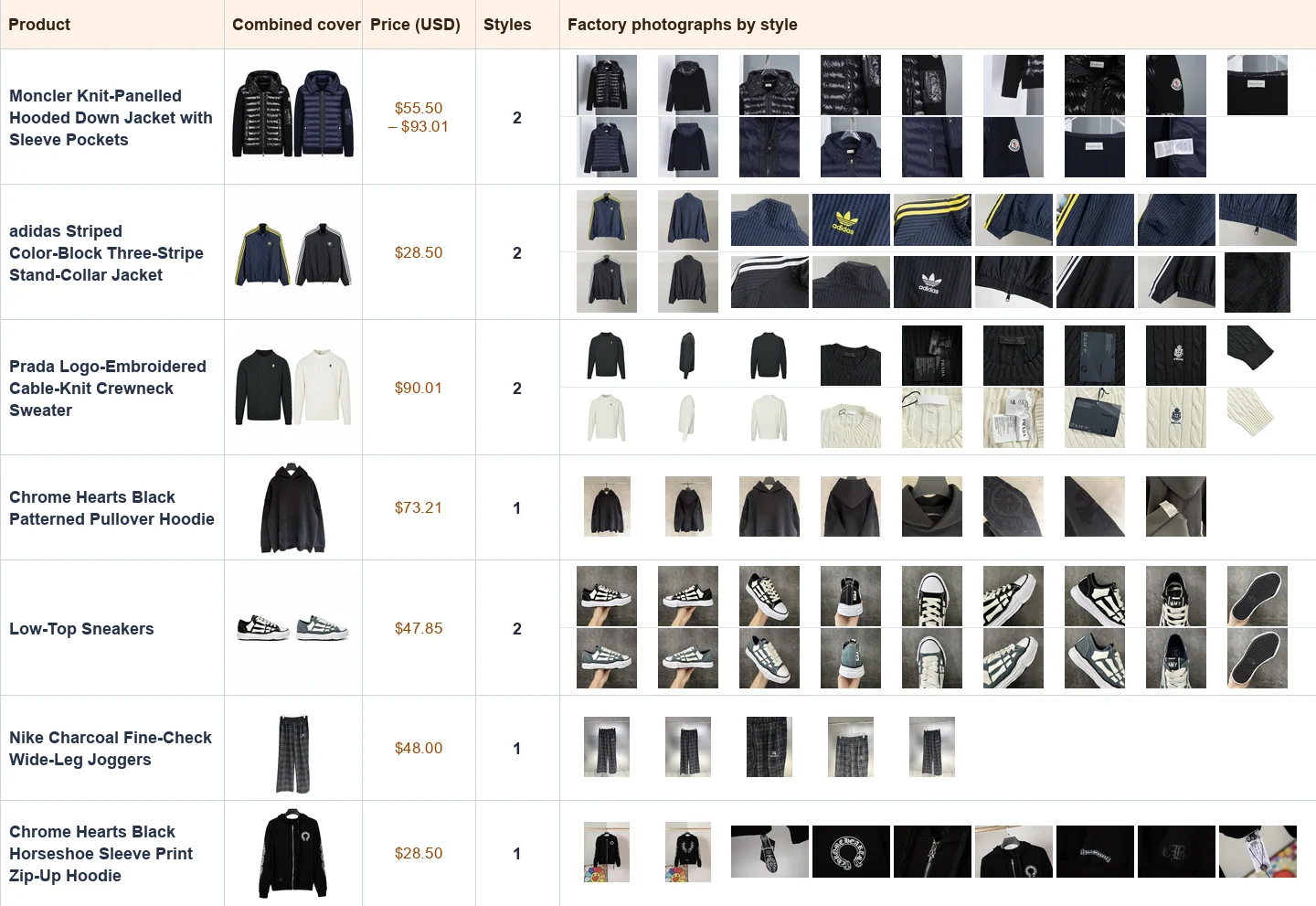
The black and ivory versions of the cable-knit crewneck share a single cover. You can compare the colours in the grid, then open the product to view the individual photos and listed sizes.
View factory photos of popular styles
Factory photos are available for selected popular items. When a sweater catches your eye, the closer views help you see how the cable pattern meets the ribbing at the cuffs and hem.
Plan the purchase with the parcel in mind
A cap with a shaped brim, a pair of boots and a soft scarf can be easy to choose separately and awkward to pack together. This independent Sugargoo catalogue helps you compare the actual products first, then think through what should reach the packing centre and how you want it to travel.
If a bag must fit a particular notebook, begin with Bags & Wallets and compare the narrowest opening, not just the outer width. If boots need to go over thick socks, start in Shoes and check the shaft and foot measurements. Add the easier choices later. This keeps a nice colour or a low accessory price from deciding the whole parcel.
We add new finds, refresh product information and check shopping links as we maintain this collection.
Seven examples from the catalogue
Read across a row to compare the combined cover, listed USD price and number of styles. Each strip on the right shows photographs from one style’s gallery.
What is Sugargoo?
sugargoo-shopping.com is an independent product catalogue. You place your order on Sugargoo.
Purchasing across Chinese stores
Sugargoo’s buying guide follows goods from the seller to its warehouse and onwards to an international parcel. This allows items bought at different times to be managed before dispatch. Keep the seller purchase and the eventual parcel separate when checking costs.
Working from the packing centre
The packing centre is the place to work with the items you intend to send. It is useful to check the received inventory and any option detail while the parcel contents can still be changed. One late-arriving piece can change the combination you want shipped.
What package simulation answers
Sugargoo documents pre-shipment package simulation for a chosen group of items and packing instructions. It is particularly relevant when a box, protective packaging or an awkward shape could change the parcel dimensions. A different group needs its own assessment.
How to shop with Sugargoo
Buy and record every item in the set
Follow the Sugargoo link, select the colour and size and check whether the option contains one or two garments. Keep the order line for each required piece until all have arrived.
Move from a catalogue item to a purchase
Sugargoo’s buying guide explains how an item order becomes a purchase from a Chinese seller. Open the product link, select the precise version and quantity on the agent and check the item charges. When you are sourcing another item with a manual order, use the seller link and clear specifications. Keep a separate note for anything you would like clarified before purchasing.
Reconcile the packing-centre list
Check that each piece has arrived and its visible details match the selection. For similar shades, compare a seam or label in the order-specific pictures. Resolve any mismatch before adding the item to the parcel.
Read the packing centre as an inventory
Compare order lines with what has been received. For a two-piece training set, account for the top and trousers; for accessories, count pairs or individual pieces according to the selected pack. Separate the product photographs used while browsing from the arrival information for your order. A discrepancy is easier to discuss while the items are still available to inspect.
Set the packaging, then compare the route
Select the stored pieces and packing preferences. If using simulation, use the resulting measurement for that arrangement. Review routes for the destination, pay the international charge and keep the tracking record with the final contents list.
Estimate the parcel you actually want to send
Sugargoo describes a pre-shipment simulation for shoppers who want packing information before final submission. Consider it when box retention, a hat brim or a bulky coat could change the parcel shape. Use the resulting or available packed measurements and destination to compare eligible routes. A tentative estimate and the final dispatch amount belong at different points in your budget.
Frequently asked questions
When is the seller’s price enough for a product comparison?
First make the contents, size, quantity and domestic delivery comparable. For a total delivered budget you will also need parcel charges for the destination.
Should I remove every shoebox to reduce parcel size?
Consider protection, storage and whether you want the original presentation. Ask what packing choices are available for those specific shoes.
Where do I find Sugargoo’s current packing instructions?
Use the official packing guide below and the options shown in your account. Compare the services available for the actual items you are submitting.
Does the simulated parcel include an item that arrives later?
A simulation concerns the selected items and packing request. Recheck the proposed parcel if the contents change.
Where should I compare a stored item with the example photo?
Use the arrival record for your order and the image of the exact option you selected. The photo table on this page illustrates how to read catalogue photos before ordering.
Do two packages with equal weight always have the same quote?
Check their dimensions, contents, route and destination. Packing a rigid box with clothing can change the options shown for the shipment.